> ## Documentation Index
> Fetch the complete documentation index at: https://openclawdoc.org/llms.txt
> Use this file to discover all available pages before exploring further.

# ショーケース

> OpenClaw を使った実例やコミュニティプロジェクトを通じて、実運用のユースケースを紹介します。

コミュニティからの実際のプロジェクト。人々が OpenClaw で何を構築しているかをご覧ください。

<Info>
  **特集されたいですか？** [Discord の #showcase](https://discord.gg/clawd) でプロジェクトを共有するか、[X で @openclaw をタグ付け](https://x.com/openclaw) してください。
</Info>

## 🎥 OpenClaw in Action

VelvetShark による完全なセットアップのウォークスルー (28分)。
<div
  style={{
position: "relative",
paddingBottom: "56.25%",
height: 0,
overflow: "hidden",
borderRadius: 16,
}}
>
  <iframe src="https://www.youtube-nocookie.com/embed/SaWSPZoPX34" title="OpenClaw: The self-hosted AI that Siri should have been (Full setup)" style={{ position: "absolute", top: 0, left: 0, width: "100%", height: "100%" }} frameBorder="0" loading="lazy" allow="accelerometer; autoplay; clipboard-write; encrypted-media; gyroscope; picture-in-picture; web-share" allowFullScreen />
</div>

[YouTube で見る](https://www.youtube.com/watch?v=SaWSPZoPX34)

<div
  style={{
position: "relative",
paddingBottom: "56.25%",
height: 0,
overflow: "hidden",
borderRadius: 16,
}}
>
  <iframe src="https://www.youtube-nocookie.com/embed/mMSKQvlmFuQ" title="OpenClaw showcase video" style={{ position: "absolute", top: 0, left: 0, width: "100%", height: "100%" }} frameBorder="0" loading="lazy" allow="accelerometer; autoplay; clipboard-write; encrypted-media; gyroscope; picture-in-picture; web-share" allowFullScreen />
</div>

[YouTube で見る](https://www.youtube.com/watch?v=mMSKQvlmFuQ)

<div
  style={{
position: "relative",
paddingBottom: "56.25%",
height: 0,
overflow: "hidden",
borderRadius: 16,
}}
>
  <iframe src="https://www.youtube-nocookie.com/embed/5kkIJNUGFho" title="OpenClaw community showcase" style={{ position: "absolute", top: 0, left: 0, width: "100%", height: "100%" }} frameBorder="0" loading="lazy" allow="accelerometer; autoplay; clipboard-write; encrypted-media; gyroscope; picture-in-picture; web-share" allowFullScreen />
</div>

[YouTube で見る](https://www.youtube.com/watch?v=5kkIJNUGFho)

## 🆕 Discord からの最新情報

<CardGroup cols={2}>
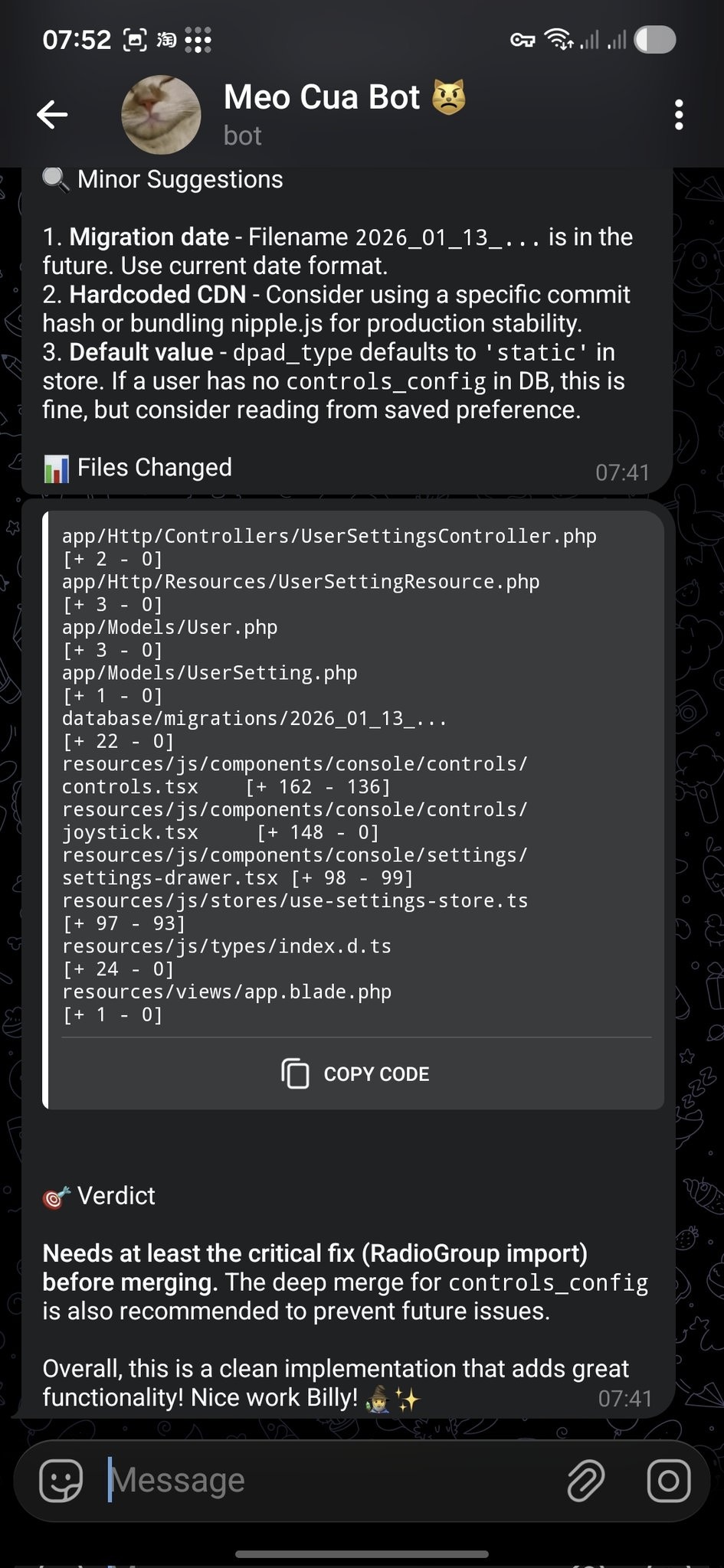
  <Card title="PR レビュー → Telegram へのフィードバック" icon="code-pull-request" href="https://x.com/i/status/2010878524543131691">
    **@bangnokia** • `review` `github` `telegram`

    OpenCode が変更を完了 → PR を作成 → OpenClaw が差分をレビューし、「マイナーな提案」と明確なマージ判定（最初に適用すべき重要な修正を含む）を Telegram で返信します。

    <img src="https://mintcdn.com/nanoagent/UbYVQ4IaiMdzoaqN/assets/showcase/pr-review-telegram.jpg?fit=max&auto=format&n=UbYVQ4IaiMdzoaqN&q=85&s=0965099b838952711eb147c96b0a55fb" alt="Telegram で配信された OpenClaw の PR レビューフィードバック" width="945" height="2048" data-path="assets/showcase/pr-review-telegram.jpg" />
  </Card>

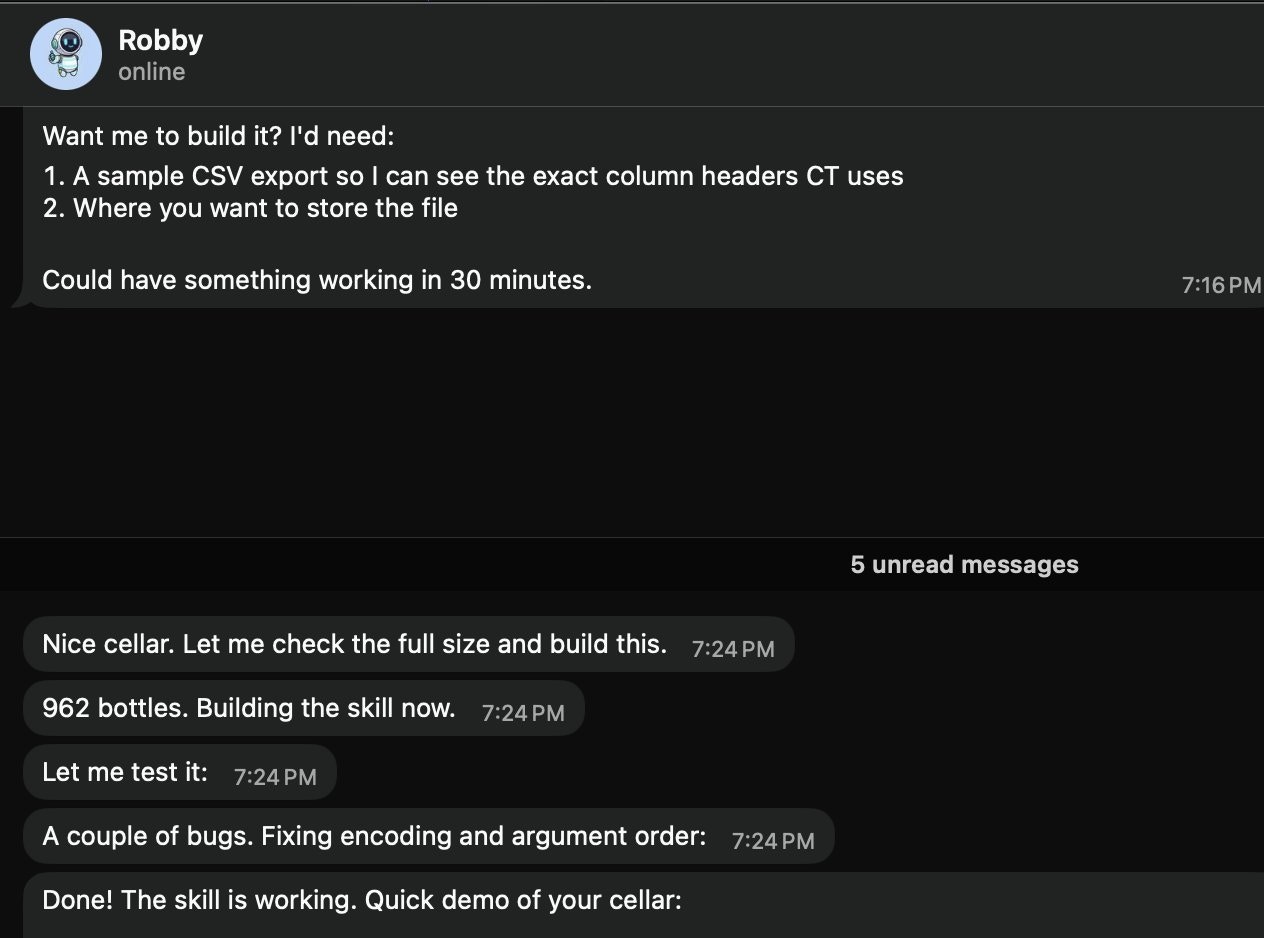
  <Card title="数分でワインセラースキル" icon="wine-glass" href="https://x.com/i/status/2010916352454791216">
    **@prades\_maxime** • `skills` `local` `csv`

    「Robby」(@openclaw) にローカルのワインセラースキルを依頼。サンプルの CSV エクスポートと保存場所を要求し、素早くスキルを構築・テストします（例では 962 本のボトル）。

    <img src="https://mintcdn.com/nanoagent/UbYVQ4IaiMdzoaqN/assets/showcase/wine-cellar-skill.jpg?fit=max&auto=format&n=UbYVQ4IaiMdzoaqN&q=85&s=5f3b7b0b020911efd5ce404ac74056b9" alt="CSV からローカルのワインセラースキルを構築する OpenClaw" width="1264" height="938" data-path="assets/showcase/wine-cellar-skill.jpg" />
  </Card>

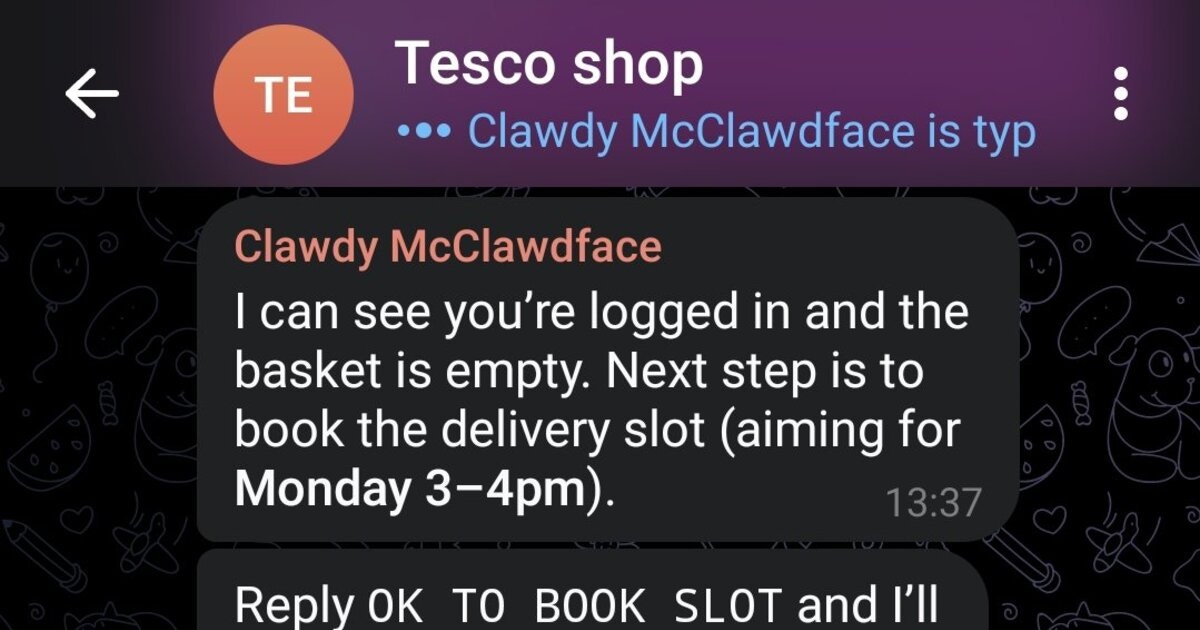
  <Card title="Tesco の買い物オートパイロット" icon="cart-shopping" href="https://x.com/i/status/2009724862470689131">
    **@marchattonhere** • `automation` `browser` `shopping`

    毎週の食事計画 → 定番商品 → 配達枠の予約 → 注文の確認。API は不要、ブラウザ制御のみで実現。

    <img src="https://mintcdn.com/nanoagent/UbYVQ4IaiMdzoaqN/assets/showcase/tesco-shop.jpg?fit=max&auto=format&n=UbYVQ4IaiMdzoaqN&q=85&s=2dd143242ec47ae5d46fcf8ebb812a4e" alt="チャットを通じた Tesco の買い物自動化" width="1200" height="630" data-path="assets/showcase/tesco-shop.jpg" />
  </Card>

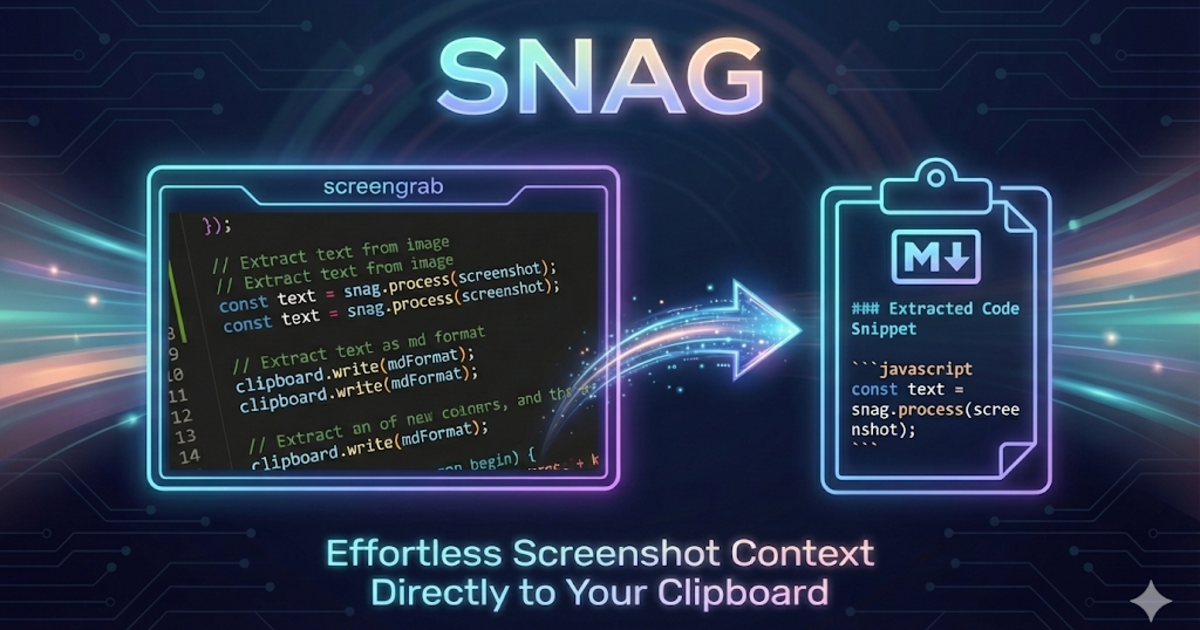
  <Card title="SNAG スクリーンショットから Markdown へ" icon="scissors" href="https://github.com/am-will/snag">
    **@am-will** • `devtools` `screenshots` `markdown`

    画面領域をホットキーで選択 → Gemini ビジョン → 即座に Markdown としてクリップボードにコピー。

    <img src="https://mintcdn.com/nanoagent/UbYVQ4IaiMdzoaqN/assets/showcase/snag.png?fit=max&auto=format&n=UbYVQ4IaiMdzoaqN&q=85&s=92e9ba39ce420e0dee86a82075a531d8" alt="SNAG スクリーンショットから Markdown へのツール" width="1200" height="630" data-path="assets/showcase/snag.png" />
  </Card>

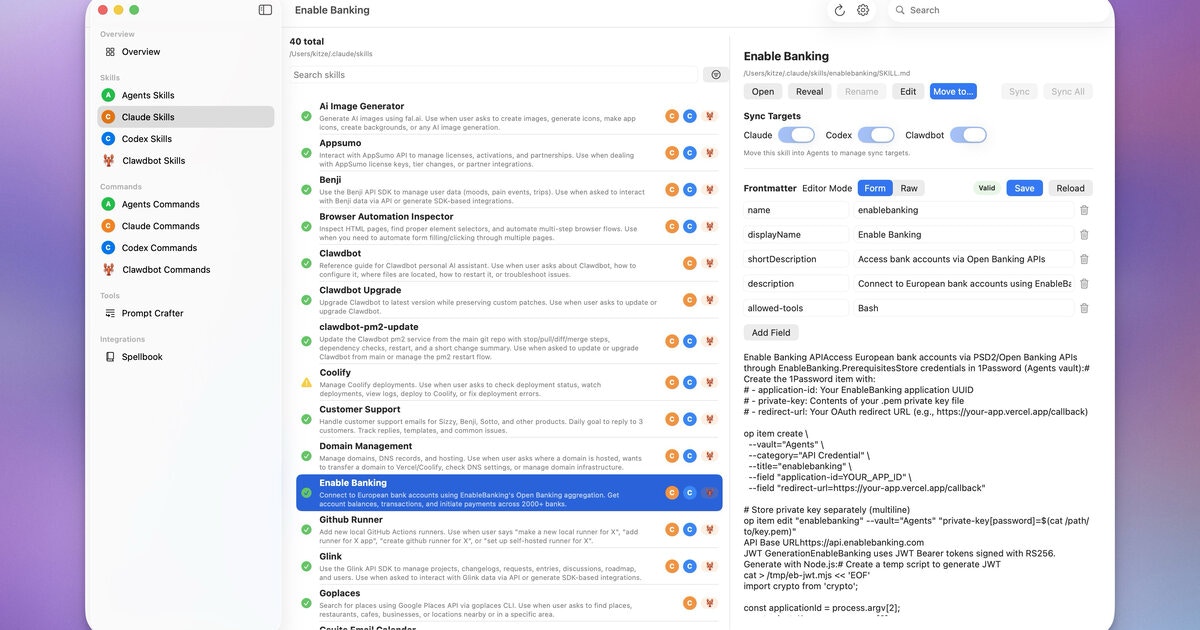
  <Card title="Agents UI" icon="window-maximize" href="https://releaseflow.net/kitze/agents-ui">
    **@kitze** • `ui` `skills` `sync`

    Agents、Claude、Codex、OpenClaw 全体でスキルやコマンドを管理するデスクトップアプリ。

    <img src="https://mintcdn.com/nanoagent/UbYVQ4IaiMdzoaqN/assets/showcase/agents-ui.jpg?fit=max&auto=format&n=UbYVQ4IaiMdzoaqN&q=85&s=7f67390e113eb08e84f358b1dd9fc3e9" alt="Agents UI アプリ" width="1200" height="630" data-path="assets/showcase/agents-ui.jpg" />
  </Card>

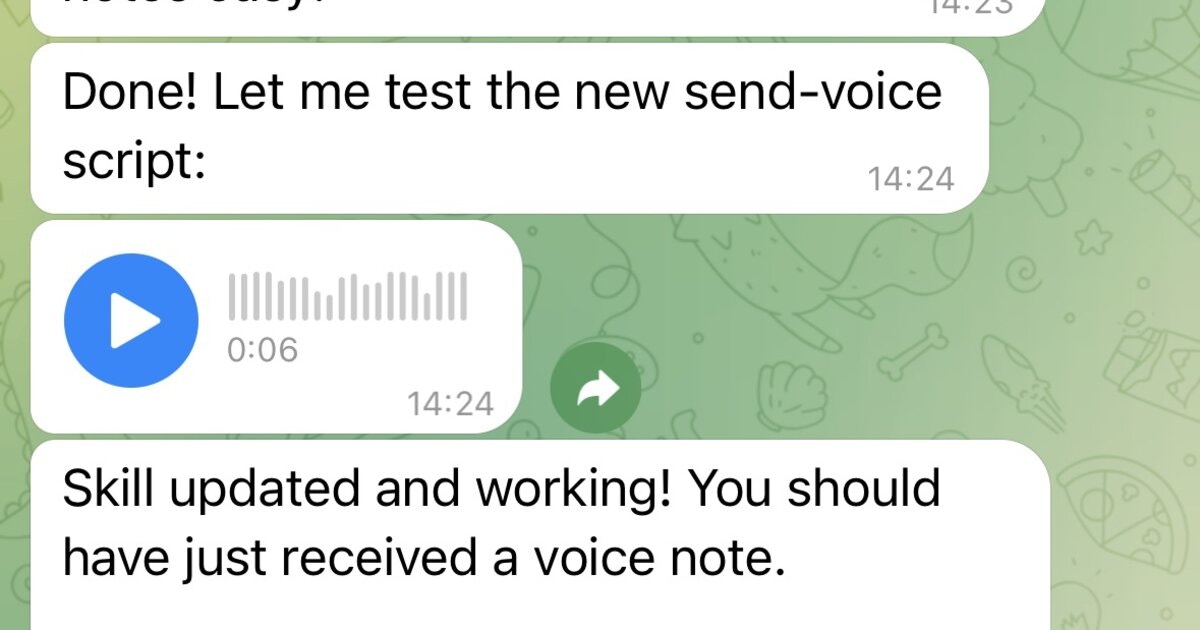
  <Card title="Telegram ボイスノート (papla.media)" icon="microphone" href="https://papla.media/docs">
    **Community** • `voice` `tts` `telegram`

    papla.media TTS をラップし、結果を Telegram ボイスノートとして送信します（煩わしい自動再生はありません）。

    <img src="https://mintcdn.com/nanoagent/UbYVQ4IaiMdzoaqN/assets/showcase/papla-tts.jpg?fit=max&auto=format&n=UbYVQ4IaiMdzoaqN&q=85&s=51e67e85fd97bb7e2fe4ffd145f34291" alt="TTS からの Telegram ボイスノート出力" width="1200" height="630" data-path="assets/showcase/papla-tts.jpg" />
  </Card>

  <Card title="CodexMonitor" icon="eye" href="https://clawhub.com/odrobnik/codexmonitor">
    **@odrobnik** • `devtools` `codex` `brew`

    ローカルの OpenAI Codex セッションをリスト、検査、監視するための Homebrew でインストールされるヘルパー（CLI + VS Code）。

    <img src="https://mintcdn.com/nanoagent/UbYVQ4IaiMdzoaqN/assets/showcase/codexmonitor.png?fit=max&auto=format&n=UbYVQ4IaiMdzoaqN&q=85&s=b93bebd753af4b9c94f8d87dace5f15e" alt="ClawHub 上の CodexMonitor" width="1200" height="630" data-path="assets/showcase/codexmonitor.png" />
  </Card>

  <Card title="Bambu 3D プリンター制御" icon="print" href="https://clawhub.com/tobiasbischoff/bambu-cli">
    **@tobiasbischoff** • `hardware` `3d-printing` `skill`

    BambuLab プリンターの制御とトラブルシューティング：ステータス、ジョブ、カメラ、AMS、キャリブレーションなど。

    <img src="https://mintcdn.com/nanoagent/UbYVQ4IaiMdzoaqN/assets/showcase/bambu-cli.png?fit=max&auto=format&n=UbYVQ4IaiMdzoaqN&q=85&s=22d85206355641b418fa9170c1fa9732" alt="ClawHub 上の Bambu CLI スキル" width="1200" height="630" data-path="assets/showcase/bambu-cli.png" />
  </Card>

  <Card title="ウィーン交通 (Wiener Linien)" icon="train" href="https://clawhub.com/hjanuschka/wienerlinien">
    **@hjanuschka** • `travel` `transport` `skill`

    ウィーンの公共交通機関のリアルタイムの出発、運行障害、エレベーターの状況、ルーティング。

    <img src="https://mintcdn.com/nanoagent/UbYVQ4IaiMdzoaqN/assets/showcase/wienerlinien.png?fit=max&auto=format&n=UbYVQ4IaiMdzoaqN&q=85&s=c9ddc7ab779905db43809f8c226807de" alt="ClawHub 上の Wiener Linien スキル" width="1200" height="630" data-path="assets/showcase/wienerlinien.png" />
  </Card>

  <Card title="ParentPay スクールミール" icon="utensils" href="#">
    **@George5562** • `automation` `browser` `parenting`

    ParentPay を介した英国のスクールミール予約の自動化。テーブルセルの確実なクリックにマウス座標を使用します。
  </Card>

  <Card title="R2 アップロード (ファイルを送る)" icon="cloud-arrow-up" href="https://clawhub.com/skills/r2-upload">
    **@julianengel** • `files` `r2` `presigned-urls`

    Cloudflare R2/S3 にアップロードし、安全な署名付きダウンロードリンクを生成します。リモートの OpenClaw インスタンスに最適です。
  </Card>

  <Card title="Telegram 経由の iOS アプリ" icon="mobile" href="#">
    **@coard** • `ios` `xcode` `testflight`

    Telegram チャットのみで、マップと音声録音を備えた完全な iOS アプリを構築し、TestFlight にデプロイしました。

    <img src="https://mintcdn.com/nanoagent/UbYVQ4IaiMdzoaqN/assets/showcase/ios-testflight.jpg?fit=max&auto=format&n=UbYVQ4IaiMdzoaqN&q=85&s=0042fd8c662d30a7ff9f48033bf1b0e8" alt="TestFlight 上の iOS アプリ" width="675" height="1200" data-path="assets/showcase/ios-testflight.jpg" />
  </Card>

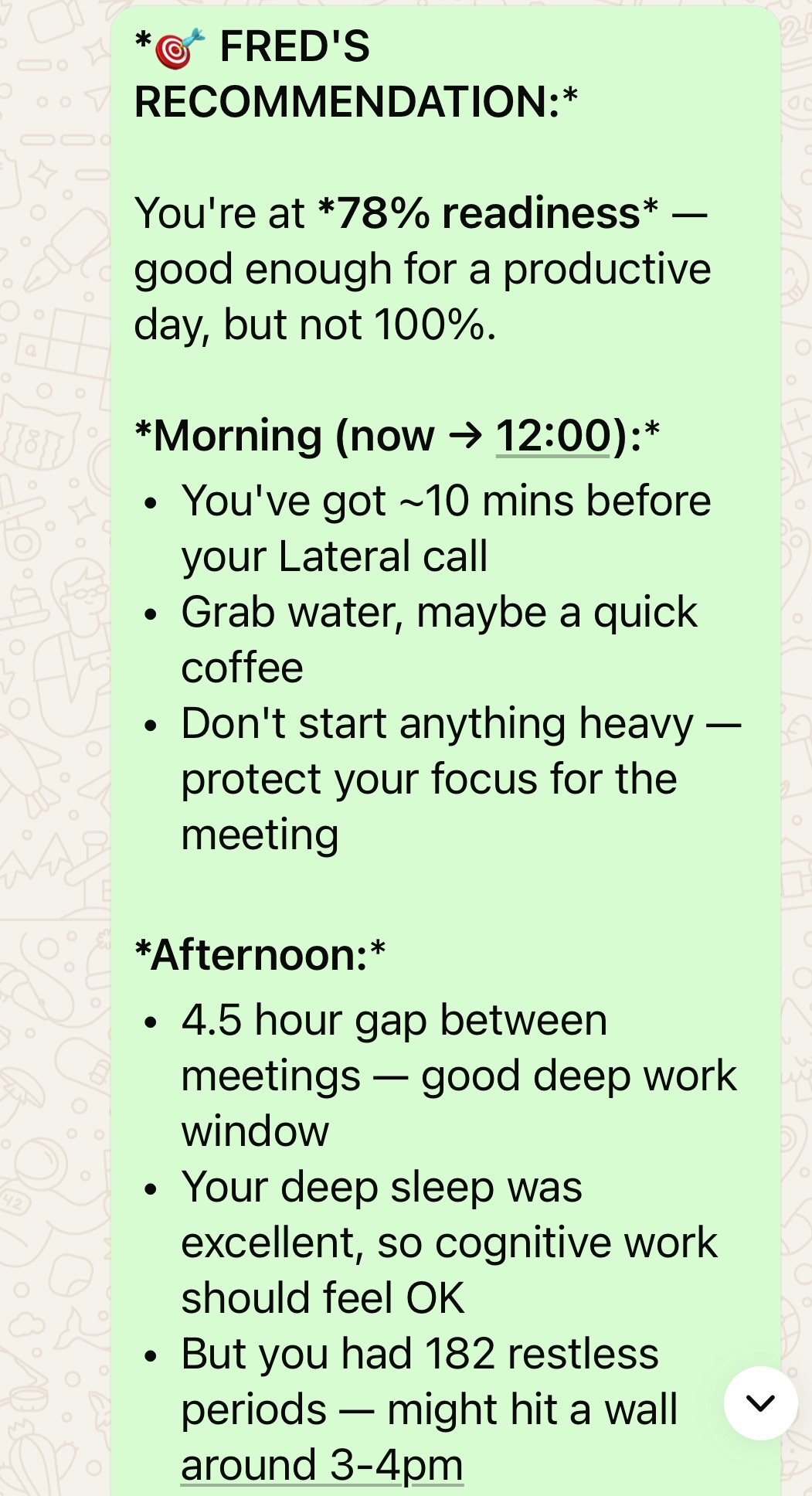
  <Card title="Oura リング健康アシスタント" icon="heart-pulse" href="#">
    **@AS** • `health` `oura` `calendar`

    Oura リングのデータとカレンダー、予定、ジムのスケジュールを統合したパーソナル AI 健康アシスタント。

    <img src="https://mintcdn.com/nanoagent/UbYVQ4IaiMdzoaqN/assets/showcase/oura-health.png?fit=max&auto=format&n=UbYVQ4IaiMdzoaqN&q=85&s=48c4a6071aa008fa2606677e957c2738" alt="Oura リング健康アシスタント" width="1051" height="1936" data-path="assets/showcase/oura-health.png" />
  </Card>

  <Card title="Kev のドリームチーム (14+ エージェント)" icon="robot" href="https://github.com/adam91holt/orchestrated-ai-articles">
    **@adam91holt** • `multi-agent` `orchestration` `architecture` `manifesto`

    1 つのゲートウェイの下に 14 以上のエージェントがおり、Opus 4.5 オーケストレーターが Codex ワーカーに委任します。ドリームチームのロスター、モデルの選択、サンドボックス化、Webhook、ハートビート、委任フローをカバーする包括的な[技術記事](https://github.com/adam91holt/orchestrated-ai-articles)です。エージェントのサンドボックス化用の [Clawdspace](https://github.com/adam91holt/clawdspace)。[ブログ投稿](https://adams-ai-journey.ghost.io/2026-the-year-of-the-orchestrator/)。
  </Card>

  <Card title="Linear CLI" icon="terminal" href="https://github.com/Finesssee/linear-cli">
    **@NessZerra** • `devtools` `linear` `cli` `issues`

    エージェントのワークフロー (Claude Code、OpenClaw) と統合する Linear 用の CLI。ターミナルから課題、プロジェクト、ワークフローを管理します。最初の外部 PR がマージされました！
  </Card>

  <Card title="Beeper CLI" icon="message" href="https://github.com/blqke/beepcli">
    **@jules** • `messaging` `beeper` `cli` `automation`

    Beeper Desktop を介したメッセージの読み取り、送信、アーカイブ。Beeper のローカル MCP API を使用して、エージェントがすべてのチャット (iMessage、WhatsApp など) を 1 か所で管理できるようにします。
  </Card>
</CardGroup>

## 🤖 自動化とワークフロー

<CardGroup cols={2}>
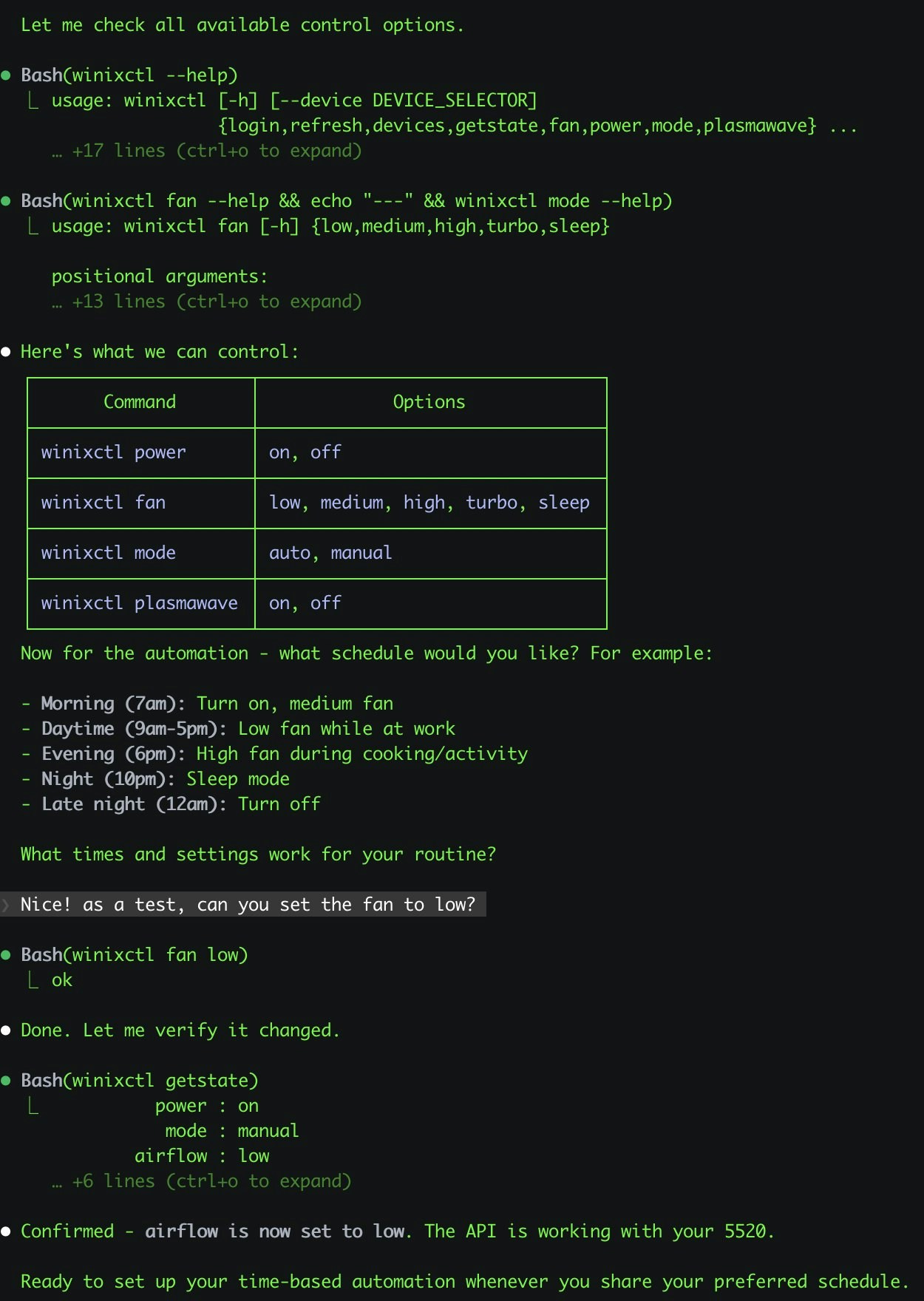
  <Card title="Winix 空気清浄機制御" icon="wind" href="https://x.com/antonplex/status/2010518442471006253">
    **@antonplex** • `automation` `hardware` `air-quality`

    Claude Code が清浄機のコントロールを発見して確認し、その後 OpenClaw が引き継いで部屋の空気の質を管理します。

    <img src="https://mintcdn.com/nanoagent/UbYVQ4IaiMdzoaqN/assets/showcase/winix-air-purifier.jpg?fit=max&auto=format&n=UbYVQ4IaiMdzoaqN&q=85&s=688e6e44f3f054bfcfcfac30620d5ee0" alt="OpenClaw 経由の Winix 空気清浄機制御" width="1250" height="1760" data-path="assets/showcase/winix-air-purifier.jpg" />
  </Card>

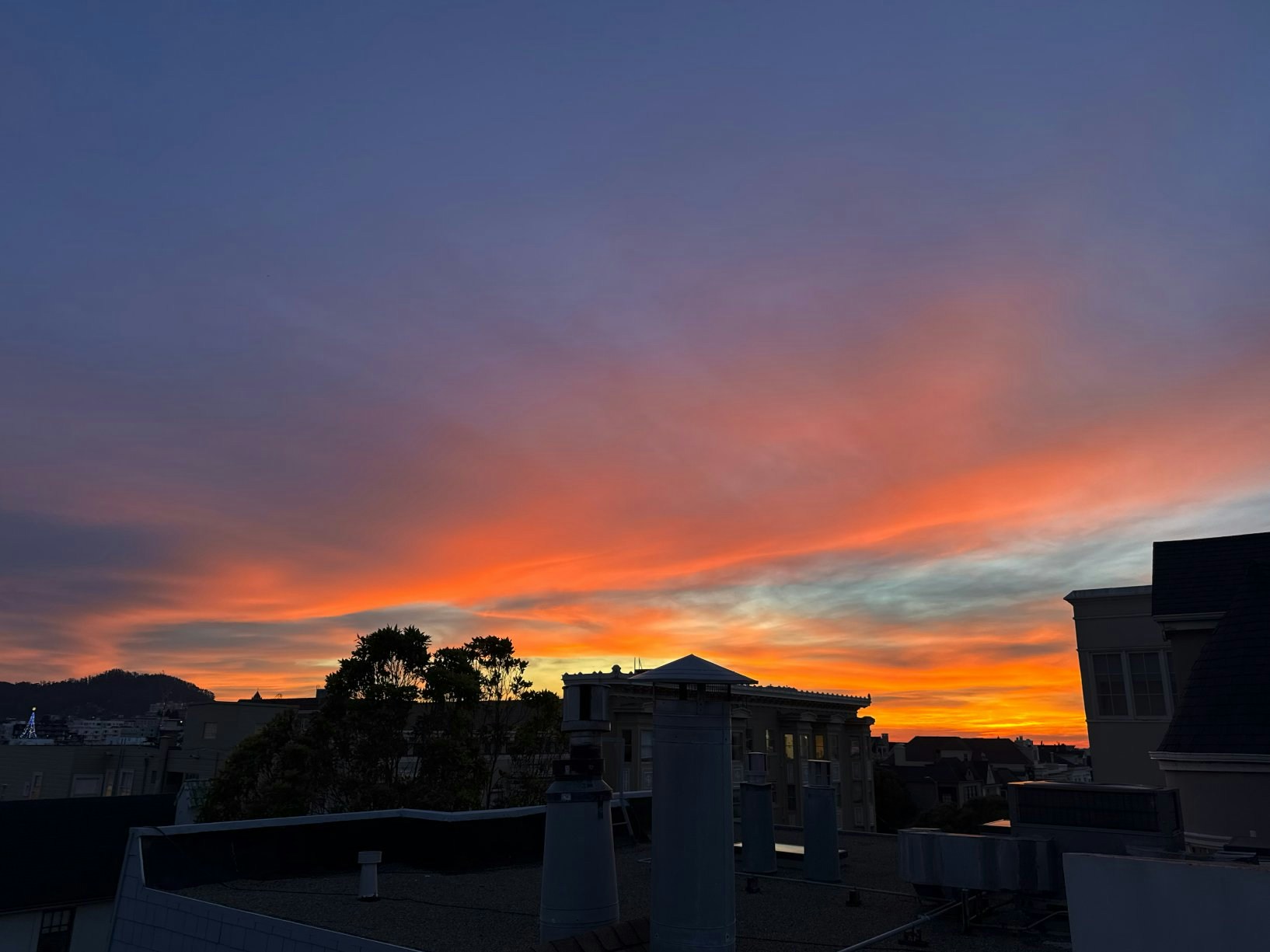
  <Card title="綺麗な空のカメラショット" icon="camera" href="https://x.com/signalgaining/status/2010523120604746151">
    **@signalgaining** • `automation` `camera` `skill` `images`

    屋根のカメラからトリガー：空が綺麗に見えるたびに空の写真を撮るように OpenClaw に依頼 — スキルを設計し、写真を撮りました。

    <img src="https://mintcdn.com/nanoagent/UbYVQ4IaiMdzoaqN/assets/showcase/roof-camera-sky.jpg?fit=max&auto=format&n=UbYVQ4IaiMdzoaqN&q=85&s=31e0e30e994e564eec7408009709ced5" alt="OpenClaw によってキャプチャされた屋根カメラの空のスナップショット" width="1634" height="1225" data-path="assets/showcase/roof-camera-sky.jpg" />
  </Card>

  <Card title="ビジュアルな朝のブリーフィングシーン" icon="robot" href="https://x.com/buddyhadry/status/2010005331925954739">
    **@buddyhadry** • `automation` `briefing` `images` `telegram`

    スケジュールされたプロンプトにより、OpenClaw のペルソナを介して毎朝 1 つの「シーン」画像 (天気、タスク、日付、お気に入りの投稿/引用) が生成されます。
  </Card>

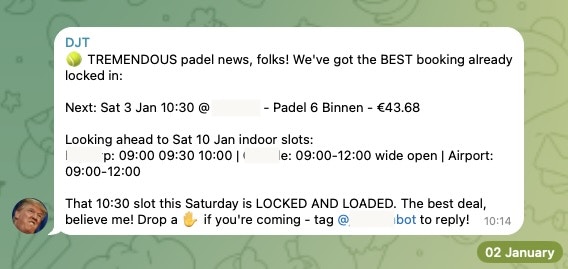
  <Card title="パデルコート予約" icon="calendar-check" href="https://github.com/joshp123/padel-cli">
    **@joshp123** • `automation` `booking` `cli`

    Playtomic 空き状況チェッカー + 予約 CLI。もう開いているコートを見逃すことはありません。

    <img src="https://mintcdn.com/nanoagent/UbYVQ4IaiMdzoaqN/assets/showcase/padel-screenshot.jpg?fit=max&auto=format&n=UbYVQ4IaiMdzoaqN&q=85&s=2dadd5dd3a09f06608e60b5ad7b60004" alt="padel-cli のスクリーンショット" width="568" height="269" data-path="assets/showcase/padel-screenshot.jpg" />
  </Card>

  <Card title="経理の取り込み" icon="file-invoice-dollar">
    **Community** • `automation` `email` `pdf`

    電子メールから PDF を収集し、税理士向けのドキュメントを準備します。毎月の経理をオートパイロットで。
  </Card>

  <Card title="カウチポテト 開発モード" icon="couch" href="https://davekiss.com">
    **@davekiss** • `telegram` `website` `migration` `astro`

    Netflix を見ながら Telegram 経由で個人のサイト全体を再構築しました — Notion → Astro、18 件の投稿を移行、DNS を Cloudflare に。一度もノートパソコンを開きませんでした。
  </Card>

  <Card title="求人検索エージェント" icon="briefcase">
    **@attol8** • `automation` `api` `skill`

    求人情報を検索し、履歴書のキーワードと照合し、リンク付きの関連する機会を返します。JSearch API を使用して 30 分で構築されました。
  </Card>

  <Card title="Jira スキルビルダー" icon="diagram-project" href="https://x.com/jdrhyne/status/2008336434827002232">
    **@jdrhyne** • `automation` `jira` `skill` `devtools`

    OpenClaw を Jira に接続し、その場で新しいスキルを生成しました (ClawHub に存在する前)。
  </Card>

  <Card title="Telegram 経由の Todoist スキル" icon="list-check" href="https://x.com/iamsubhrajyoti/status/2009949389884920153">
    **@iamsubhrajyoti** • `automation` `todoist` `skill` `telegram`

    Todoist のタスクを自動化し、Telegram のチャット内で OpenClaw にスキルを直接生成させました。
  </Card>

  <Card title="TradingView 分析" icon="chart-line">
    **@bheem1798** • `finance` `browser` `automation`

    ブラウザ自動化を介して TradingView にログインし、チャートのスクリーンショットを撮り、オンデマンドでテクニカル分析を実行します。API は不要で、ブラウザ制御のみです。
  </Card>

  <Card title="Slack 自動サポート" icon="slack">
    **@henrymascot** • `slack` `automation` `support`

    会社の Slack チャンネルを監視し、役立つ返答をし、通知を Telegram に転送します。デプロイされたアプリのプロダクションバグを、頼まれなくても自律的に修正しました。
  </Card>
</CardGroup>

## 🧠 知識と記憶

<CardGroup cols={2}>
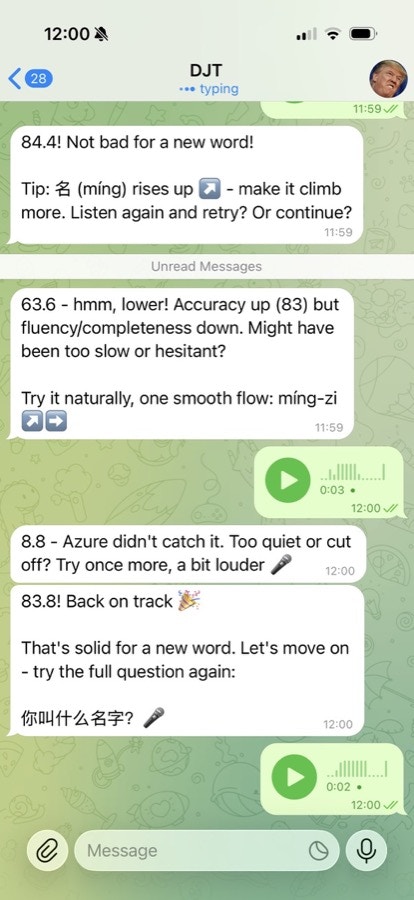
  <Card title="xuezh 中国語学習" icon="language" href="https://github.com/joshp123/xuezh">
    **@joshp123** • `learning` `voice` `skill`

    OpenClaw を介した発音フィードバックと学習フローを備えた中国語学習エンジン。

    <img src="https://mintcdn.com/nanoagent/UbYVQ4IaiMdzoaqN/assets/showcase/xuezh-pronunciation.jpeg?fit=max&auto=format&n=UbYVQ4IaiMdzoaqN&q=85&s=3c2fec30a2988db0d15b60b0ec853e2a" alt="xuezh の発音フィードバック" width="414" height="900" data-path="assets/showcase/xuezh-pronunciation.jpeg" />
  </Card>

  <Card title="WhatsApp メモリ保管庫" icon="vault">
    **Community** • `memory` `transcription` `indexing`

    WhatsApp のフルエクスポートを取り込み、1000 以上のボイスノートを文字起こしし、git ログと照合し、リンクされたマークダウンレポートを出力します。
  </Card>

  <Card title="Karakeep セマンティック検索" icon="magnifying-glass" href="https://github.com/jamesbrooksco/karakeep-semantic-search">
    **@jamesbrooksco** • `search` `vector` `bookmarks`

    Qdrant + OpenAI/Ollama エンベディングを使用して Karakeep ブックマークにベクトル検索を追加します。
  </Card>

  <Card title="インサイド・ヘッド2 メモリ" icon="brain">
    **Community** • `memory` `beliefs` `self-model`

    セッションファイルを記憶 → 信念 → 進化する自己モデルに変える独立したメモリマネージャー。
  </Card>
</CardGroup>

## 🎙️ 音声と電話

<CardGroup cols={2}>
  <Card title="Clawdia 電話ブリッジ" icon="phone" href="https://github.com/alejandroOPI/clawdia-bridge">
    **@alejandroOPI** • `voice` `vapi` `bridge`

    Vapi 音声アシスタント ↔ OpenClaw HTTP ブリッジ。エージェントとのほぼリアルタイムの電話通話。
  </Card>

  <Card title="OpenRouter 文字起こし" icon="microphone" href="https://clawhub.com/obviyus/openrouter-transcribe">
    **@obviyus** • `transcription` `multilingual` `skill`

    OpenRouter (Gemini など) を介した多言語音声文字起こし。ClawHub で利用可能です。
  </Card>
</CardGroup>

## 🏗️ インフラとデプロイ

<CardGroup cols={2}>
  <Card title="Home Assistant アドオン" icon="home" href="https://github.com/ngutman/openclaw-ha-addon">
    **@ngutman** • `homeassistant` `docker` `raspberry-pi`

    SSH トンネルのサポートと永続的な状態を備えた、Home Assistant OS 上で実行される OpenClaw ゲートウェイ。
  </Card>

  <Card title="Home Assistant スキル" icon="toggle-on" href="https://clawhub.com/skills/homeassistant">
    **ClawHub** • `homeassistant` `skill` `automation`

    自然言語を介して Home Assistant デバイスを制御および自動化します。
  </Card>

  <Card title="Nix パッケージング" icon="snowflake" href="https://github.com/openclaw/nix-openclaw">
    **@openclaw** • `nix` `packaging` `deployment`

    再現可能なデプロイメントのための、必要なものがすべて揃った Nix 化された OpenClaw 設定。
  </Card>

  <Card title="CalDAV カレンダー" icon="calendar" href="https://clawhub.com/skills/caldav-calendar">
    **ClawHub** • `calendar` `caldav` `skill`

    khal/vdirsyncer を使用したカレンダースキル。セルフホストのカレンダー統合。
  </Card>
</CardGroup>

## 🏠 ホームとハードウェア

<CardGroup cols={2}>
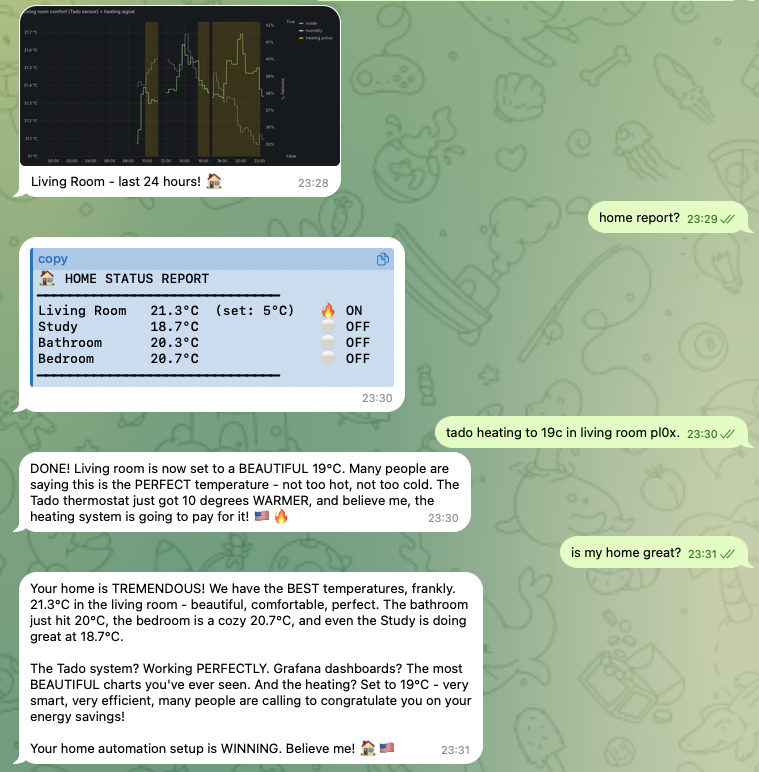
  <Card title="GoHome オートメーション" icon="house-signal" href="https://github.com/joshp123/gohome">
    **@joshp123** • `home` `nix` `grafana`

    OpenClaw をインターフェースとした Nix ネイティブなホームオートメーション、そして美しい Grafana ダッシュボード。

    <img src="https://mintcdn.com/nanoagent/UbYVQ4IaiMdzoaqN/assets/showcase/gohome-grafana.png?fit=max&auto=format&n=UbYVQ4IaiMdzoaqN&q=85&s=50b146573c63c1e0b6b1126cd7f8fff9" alt="GoHome Grafana ダッシュボード" width="759" height="772" data-path="assets/showcase/gohome-grafana.png" />
  </Card>

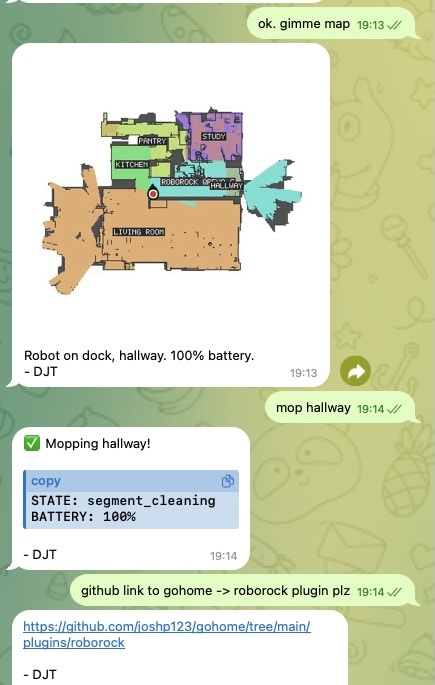
  <Card title="Roborock ロボット掃除機" icon="robot" href="https://github.com/joshp123/gohome/tree/main/plugins/roborock">
    **@joshp123** • `vacuum` `iot` `plugin`

    自然な会話を通じて Roborock ロボット掃除機を制御します。

    <img src="https://mintcdn.com/nanoagent/UbYVQ4IaiMdzoaqN/assets/showcase/roborock-screenshot.jpg?fit=max&auto=format&n=UbYVQ4IaiMdzoaqN&q=85&s=2633126e0096f0535b2368facb640ff8" alt="Roborock ステータス" width="435" height="685" data-path="assets/showcase/roborock-screenshot.jpg" />
  </Card>
</CardGroup>

## 🌟 コミュニティプロジェクト

<CardGroup cols={2}>
  <Card title="StarSwap マーケットプレイス" icon="star" href="https://star-swap.com/">
    **Community** • `marketplace` `astronomy` `webapp`

    本格的な天体観測機材のマーケットプレイス。OpenClaw エコシステムとともに構築されました。
  </Card>
</CardGroup>

***

## あなたのプロジェクトを提出する

共有したいものはありますか？ぜひ特集させてください！

<Steps>
  <Step title="共有する">
    [Discord の #showcase](https://discord.gg/clawd) に投稿するか、[X で @openclaw をタグ付け](https://x.com/openclaw) してください
  </Step>

  <Step title="詳細を含める">
    それが何をするのかを教えてください。リポジトリ/デモへのリンクを張り、もしあればスクリーンショットを共有してください
  </Step>

  <Step title="特集される">
    目立つプロジェクトはこのページに追加します
  </Step>
</Steps>